デバッグ(D) => …のプロパティ => デバッグ
※リモートコンピューターのIPアドレスが変更されたときはここを変更
grepコマンドの使い方
-I : 検索結果からバイナリを除外する
(exa.)
|
1 |
$ grep -I "pattern" |
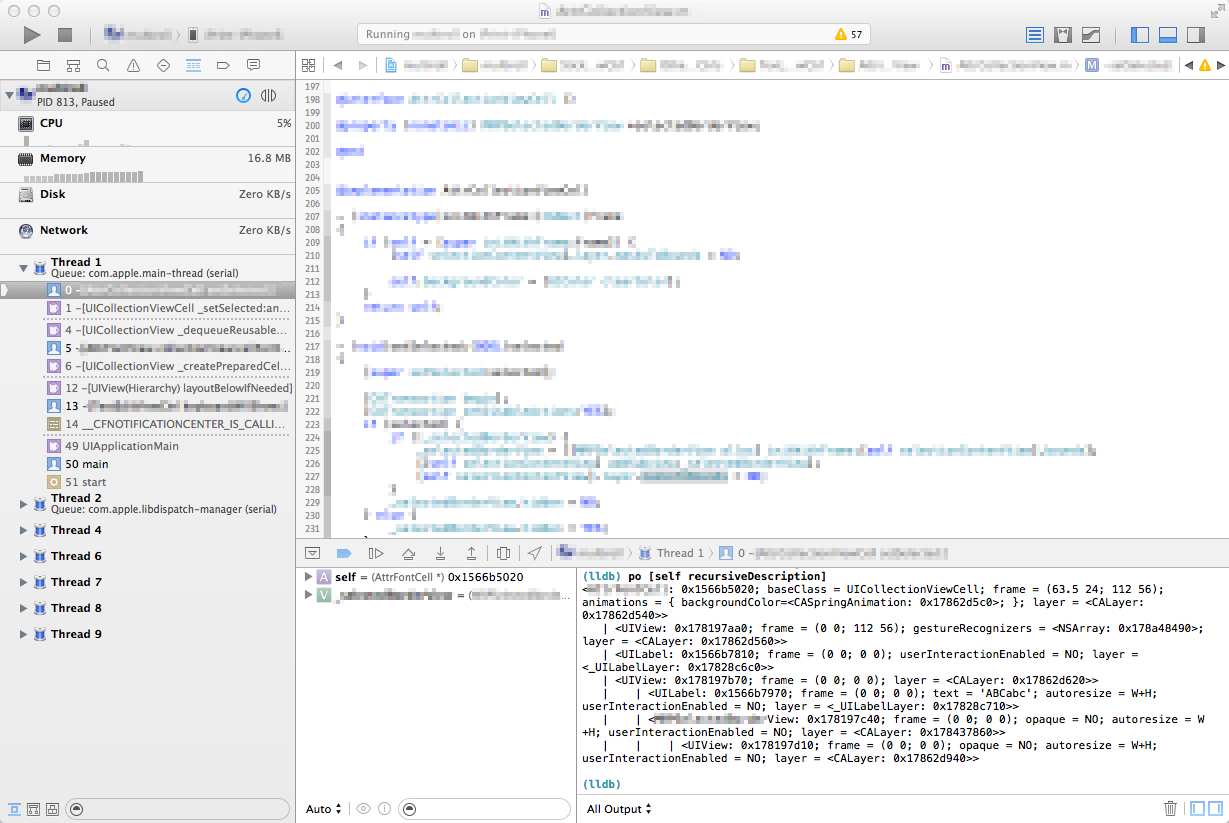
Xcodeデバッグ print-object
Xcode6のコマンドラインにてブレイク中にオブジェクトを表示する。
print-objectコマンド
|
1 |
(lldb) po foo_object |
UIViewの階層表示
|
1 |
(lldb) po [[bar view] recursiveDescription] |
出力例
|
1 2 3 4 5 6 7 |
<FooView: 0x1566b5020; baseClass = UICollectionViewCell; frame = (63.5 24; 112 56); animations = { backgroundColor=<CASpringAnimation: 0x17862d5c0>; }; layer = <CALayer: 0x17862d540>> | <UIView: 0x178197aa0; frame = (0 0; 112 56); gestureRecognizers = <NSArray: 0x178a48490>; layer = <CALayer: 0x17862d560>> | <UILabel: 0x1566b7810; frame = (0 0; 0 0); userInteractionEnabled = NO; layer = <_UILabelLayer: 0x17828c6c0>> | <UIView: 0x178197b70; frame = (0 0; 0 0); layer = <CALayer: 0x17862d620>> | | <UILabel: 0x1566b7970; frame = (0 0; 0 0); text = 'ABCabc'; autoresize = W+H; userInteractionEnabled = NO; layer = <_UILabelLayer: 0x17828c710>> | | <BarView: 0x178197c40; frame = (0 0; 0 0); opaque = NO; autoresize = W+H; userInteractionEnabled = NO; layer = <CALayer: 0x178437860>> | | | <UIView: 0x178197d10; frame = (0 0; 0 0); opaque = NO; autoresize = W+H; userInteractionEnabled = NO; layer = <CALayer: 0x17862d940>> |
sshにknown_hostsを無視させる
IPアドレスが動的に変更されるネットワーク環境にあるsshサーバーに接続するときknown_hostsを無視させる方法
解決策
~/.ssh/config に設定(追記)する
|
1 2 3 4 5 |
Host 192.168.0.* StrictHostKeyChecking no UserKnownHostsFile /dev/null |
C++/CLI と C++/CX の比較
| 言語名 | C++/CLI | C++/CX |
|---|---|---|
| 正式名称 | C++ with Common Language Interface | C++ with Component eXtensions |
| プラットフォーム | Common Language Runtime (CLR) (.NET Framework) |
Windows Runtime (WinRT) |
| 開発対象 | デスクトップ アプリ | Windows ストア アプリ (モダンUIアプリ) |
| 文字列型 | System.String | Platform::String |
| 配列の確保 | array<int>^ myArray = gcnew array<int>(10); | Array<int>^ myArray = ref new Array<int>(10); |
command line developer tools インストール方法 for xcode 5.1
MacOS 10.9 (Mavericks)、xcode 5.1での command line developer tools のインストール方法
|
1 |
$ xcode-select --install |
snmpwalkの使い方
|
1 |
$ snmpwalk -v 1 -c public 192.168.0.xx . |
- -v
- SNMP version
- -c
- community
[git] タグのリネーム方法
1. 新しいローカル・タグの追加
|
1 |
$ git tag NEW_TAG_NAME OLD_TAG_NAME |
2. 古いローカル・タグの削除
|
1 |
$ git tag -d OLD_TAG_NAME |
3. 古いリモート・タグの削除
|
1 |
$ git push origin :refs/tags/OLD_TAG_NAME |
4. 新しいリモート・タグのプッシュ
|
1 |
$ git push origin NEW_TAG_NAME |
|
1 |
$ git push --tags origin |
関連リンク
sshクライアント接続設定
~/.ssh/config
|
1 2 3 4 5 6 7 |
ServerAlive Internal 60 # 再接続間隔 60秒 ServerAliveCountMax 120 # 再接続回数 120回 (例, 60秒×120回=2時間) Host myConnectionAlias # ssh接続 別名 HostName 192.168.0.123 # ホスト名(IPアドレス) User myAccountName # アカウント名 IdentityFile ~/.ssh/my_private_rsa |
接続方法例
|
1 |
$ ssh myAccountName@192.168.0.123 -i ~/.ssh/my_private_rsa |
⇓
|
1 |
$ ssh myConnectionAlias |
git svn dcommit エラー
|
1 2 3 4 5 6 7 8 9 10 11 12 13 |
$ git svn dcommit Committing to http://10.0.xx.xx/svn/xxx/trunk ... ERROR from SVN: URL access forbidden for unknown reason: access to '/svn/xxx/!svn/act/cc67ae8c-0dbc-4617-b691-8c0d32e2c51c' forbidden W: f0cb8a033f53abad69878f32d49060c566ccefe0 and refs/remotes/trunk differ, using rebase: :040000 040000 82025ea8b1266eb4fb3017c1e5eee026d407b7a2 22b412b9539c90a020752cdb5fc3d961e45ba75a M Classes :040000 040000 297335c9239410a3dfc7a97d2a4f32cd73ed78c7 22e7da8ed21d9875ff8e5c00905b4cd15f25b337 M xxxxx-lib :040000 040000 92f3164b6273cc59da1f07f1b59531b3da72c306 dd4c87d1c3d4a92944bb037d368a51903f9636f0 M xxxxx_xx.xcodeproj Current branch master is up to date. ERROR: Not all changes have been committed into SVN, however the committed ones (if any) seem to be successfully integrated into the working tree. Please see the above messages for details. |
git-svnを使ったコミット(git svn dcommit)に失敗し続けて丸一日悩みました。
rebaseして、mergeして、試行錯誤してようやく判明した原因はSubversionリポジトリに読み取り権限だけが与えられていて書き込み権限は与えられていなかった… 🙁