NSStringからNSURLへの変換
Scheme (file,http,ftp,mailtoなど) がNSStringに含まれているとき
|
1 2 3 |
NSString *strURL = @"file:///private/var/mobile/Containers/Data/Application/25B9XXXX-XXXX-XXXX-XXXX-05A4B827XXXX/tmp/MyLocalPhotos/xxxx.jpg NSURL *aURL = [NSURL URLWithString:strURL]; |
Scheme "file" がNSStringに含まれていないとき(file://を付加したいとき)
|
1 2 3 |
NSString *strFilePath = @"/private/var/mobile/Containers/Data/Application/25B9XXXX-XXXX-XXXX-XXXX-05A4B827XXXX/tmp/MyLocalPhotos/xxxx.jpg NSURL *aURL = [NSURL fileURLWithPath:strFilePath]; |
GCD(Ground Central Dispatch)のメモリ管理方法
| Deployment Target | メモリ管理方法 |
|---|---|
| iOS6未満 | ARC管理外 |
| iOS6以上 | ARC管理下 |
XcodeでAPIリファレンスへジャンプ
- APIリファレンスへジャンプ
- ⌥ (option) + Double click
- ヘッダファイルへジャンプ
- ⌘ (command) + Double click
compileSdkVersion ‘android-24’ requires JDK 1.8 or later to compile
症状
compileSdkVersion ‘android-24’ requires JDK 1.8 or later to compile が発生しビルドに失敗する。
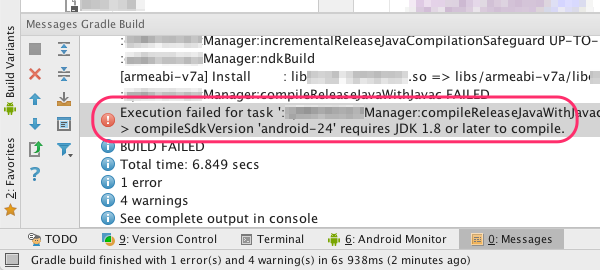
原因
API 23まではJDK 1.7でコンパイル可能であったが、API 24以降はJDK 1.8が必須となった。
ローカル環境にJDK 1.8がインストール済みであっても、Android Studioは自動的(暗黙的)にJDK 1.8に参照を切り替えることはしない。JDK 1.8を参照するようにAndroid Studioの設定を変更する必要がある。
nodebrew install が No such file or directory で失敗
homebrewでインストールしたnodebrewで初めてnode.jsのインストールを実行すると"No such file or directory" にて失敗する。
現象
|
1 2 3 4 5 6 7 8 |
$ nodebrew install-binary v6.1.0 Fetching: https://nodejs.org/dist/v6.1.0/node-v6.1.0-darwin-x64.tar.gz Warning: Failed to create the file Warning: /Users/chihayafuru/.nodebrew/src/v6.1.0/node-v6.1.0-darwin-x64.tar.gz: Warning: No such file or directory curl: (23) Failed writing body (0 != 941) download failed: https://nodejs.org/dist/v6.1.0/node-v6.1.0-darwin-x64.tar.gz |
Macにおけるnodebrewのインストール
nodebrewとは
複数のバージョンのnode.jpをインストールし、必要に応じて切り替えるためのバージョン管理ツール
nodebrewのアンインストール
nodebrewをhomebrewで管理(インストール、バージョンアップ)するための下準備
|
1 |
$ curl -L git.io/nodebrew | perl - setup |
にて直接インストールしたnodebrewをアンインストールする方法
~/.nodebrew フォルダを削除する。必要に応じて .bash_profile などからPATHの設定を削除する。
homebrewからのnodebrewのインストール
|
1 2 3 4 5 6 7 8 9 10 11 12 13 14 15 16 17 18 19 |
$ brew install nodebrew ==> Downloading https://github.com/hokaccha/nodebrew/archive/v0.9.6.tar.gz ==> Downloading from https://codeload.github.com/hokaccha/nodebrew/tar.gz/v0.9.6 ######################################################################## 100.0% ==> /usr/local/Cellar/nodebrew/0.9.6/bin/nodebrew setup_dirs ==> Caveats Add path: export PATH=$HOME/.nodebrew/current/bin:$PATH To use Homebrew's directories rather than ~/.nodebrew add to your profile: export NODEBREW_ROOT=/usr/local/var/nodebrew Bash completion has been installed to: /usr/local/etc/bash_completion.d zsh completion has been installed to: /usr/local/share/zsh/site-functions ==> Summary ? /usr/local/Cellar/nodebrew/0.9.6: 7 files, 36.8K, built in 7 seconds |
nodebrewの設定環境作成
|
1 2 3 4 5 6 7 8 9 |
$ nodebrew setup Fetching nodebrew... Installed nodebrew in $HOME/.nodebrew ======================================== Export a path to nodebrew: export PATH=$HOME/.nodebrew/current/bin:$PATH ======================================== |
結果として ~/.nodebrew フォルダ以下が作成される。
nodebrewを使ったnode.jsのインストール
|
1 2 3 4 5 6 7 8 9 10 |
$ nodebrew install-binary v6.1.0 Fetching: https://nodejs.org/dist/v6.1.0/node-v6.1.0-darwin-x64.tar.gz ############# 18.3%^Cdownload failed: https://nodejs.org/dist/v6.1.0/node-v6.1.0-darwin-x64.tar.gz aquarius:~ chihayafuru$ nodebrew install-binary v6.1.0 Fetching: https://nodejs.org/dist/v6.1.0/node-v6.1.0-darwin-x64.tar.gz 1.0%^Cdownload failed: https://nodejs.org/dist/v6.1.0/node-v6.1.0-darwin-x64.tar.gz aquarius:~ chihayafuru$ nodebrew install-binary v6.1.0 Fetching: https://nodejs.org/dist/v6.1.0/node-v6.1.0-darwin-x64.tar.gz ######################################################################## 100.0% Installed successfully |
EC2のLet’s Encryptの証明書更新がImportErrorで失敗する
AWSのEC2(Amazon Linux)において、Let’s Encryptの証明書更新がImportErrorで失敗する
=== 症状 ===
|
1 2 3 4 5 6 7 8 9 10 11 12 13 14 |
$ /usr/local/letsencrypt/certbot-auto renew Creating virtual environment... Installing Python packages... Installation succeeded. Requesting root privileges to run certbot... /home/ec2-user/.local/share/letsencrypt/bin/letsencrypt renew Traceback (most recent call last): File "/home/ec2-user/.local/share/letsencrypt/bin/letsencrypt", line 7, in <module> from certbot.main import main File "/home/ec2-user/.local/share/letsencrypt/local/lib/python2.7/dist-packages/certbot/main.py", line 12, in <module> import zope.component File "/home/ec2-user/.local/share/letsencrypt/local/lib/python2.7/dist-packages/zope/component/__init__.py", line 16, in <module> from zope.interface import Interface ImportError: No module named interface |
UICollectionViewの背景(色)を指定
|
1 2 3 |
UIView *aView = [[UIView init] alloc]; aView.backgroundColor = [UIColor whiteColor]; self.collectionView.backgroundView = aView; |
collectionView.backgroundColorに直接UIColorを指定しても反映されない。
errno
|
1 2 3 |
#include <errno.h> printf("errno = %d, %s\n", errno, strerror(errno)); |